← index #731Issue #626
Off-topic · high · value 1.147
QUERY · ISSUE

Raspberry Pi Pico and SD Card module

openby catietravers33opened 2023-09-15updated 2025-03-25

Hi there,

I've been trying really hard to sort out this error with wiring and looking at other forums but just cannot work it out.

This is the error message I get when using sdcard.py:
Traceback (most recent call last):
File "<stdin>", line 19, in <module>
File "sdcard.py", line 231, in readblocks
OSError: [Errno 5] EIO

And this is the code I am calling it from:
import machine
import sdcard, uos
import time

cs = machine.Pin(13, machine.Pin.OUT)

Intialize SPI peripheral (start with 1 MHz)

spi = machine.SPI(1,
baudrate=1000000,
polarity=0,
phase=0,
bits=8,
firstbit=machine.SPI.MSB,
sck=machine.Pin(14),
mosi=machine.Pin(15),
miso=machine.Pin(12))
sd = sdcard.SDCard(spi, cs)
time.sleep_ms(500)
vfs = uos.VfsFat(sd)
uos.mount(vfs, "/sd")
#uos.mount(sd, '/sd')
time.sleep_ms(500)
print(uos.listdir('/sd'))

If anyone could help that would be appreciated!

1 comment
BNNorman · 2025-03-25

sdcard resets the SPI baudrate to 1320000 (default) so there's no point doing it in the SPI constructor.

If you want to change it do it here:-

sd = sdcard.SDCard(spi, cs,baudrate=<whatever you want>)

I have set it to 20,000,000 and can read my sandisk ultra sdcard. See my issue #990 posted today.

I never got 25,000,000 to work, but that may just be my sdcard hdw.

CANDIDATE · ISSUE

SDcard save year

closedby Gianfilippo980opened 2023-03-05updated 2023-03-07

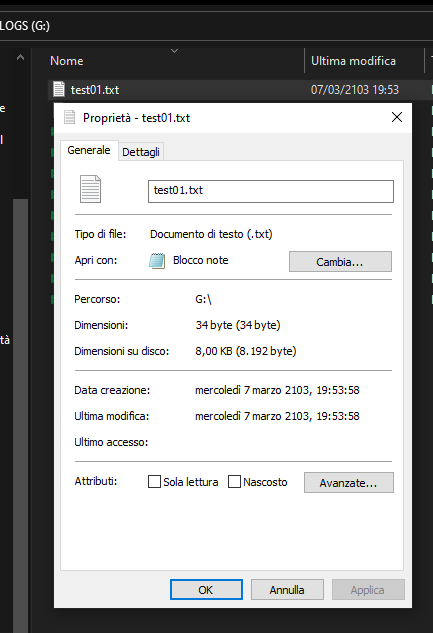
Whenever I write a fie to a MicroSD card from my Raspberry Pi Pico, if I open the card in a computer the date in something like 05/03/2103 (current date +80 years).
I am sure that the RTC on the Pico is set correctly (i do write a timestamp in the file, and I tested with it connected to a PC with Thonny which syncs it up). This is not a deal breaker, as I said, I do write a timestamp in the file, but it looks strange.

I downloaded the sdcard.py file a couple of days ago from this repository and my Pico is running MicroPython 1.19.
The simplest code that I tried is:

import sdcard
import uos

# Assign chip select (CS) pin (and start it high)
cs = machine.Pin(17, machine.Pin.OUT)

# Intialize SPI peripheral (start with 1 MHz)
spi = machine.SPI(0,
                  baudrate=1000000,
                  polarity=0,
                  phase=0,
                  bits=8,
                  firstbit=machine.SPI.MSB,
                  sck=machine.Pin(18),
                  mosi=machine.Pin(19),
                  miso=machine.Pin(16))

# Initialize SD card
sd = sdcard.SDCard(spi, cs)

# Mount filesystem
vfs = uos.VfsFat(sd)
uos.mount(vfs, "/sd")

try:
    open("/sd/non.txt", "r")
except:
    print ("Non c'è")
else:
    print ("C'è")

# Create a file and write something to it
with open("/sd/test01.txt", "w") as file:
    file.write("Hello, SD World!\r\n")
    file.write("This is a test\r\n")

# Open the file we just created and read from it
with open("/sd/test01.txt", "r") as file:
    data = file.read()
    print(data)```
3 comments
dpgeorge · 2023-03-07

I tested a Pico W with USB MSC enabled, and a VfsFat filesystem. Writing to a file from the Pico W, and then viewing the file on the PC, the date is correct.

Can you run machine.RTC().datetime() before opening the file, to see exactly what datetime it is using for the file's timestamp?

Gianfilippo980 · 2023-03-07

Well, yes, my first suspect was that I somehow had set the RTC wrong, but, as you can see... it isn't.
image
image
I also opened the SD from Raspberry, just in case this was linked to Windows, but it has the same issue.
Again, this is not really too big of an issue for me, it just looks odd.

dpgeorge · 2023-03-07

Oh, I see you are using MicroPython v1.19.

I think your issue is exactly the same as https://github.com/micropython/micropython/issues/9535 and has been fixed in the firmware in https://github.com/micropython/micropython/commit/92d911803812100fac109b6108ab005e7bbd4c82

So please try the latest "unstable" release of firmware, that should fix the issue.

Keyboard

j / / n
next pair
k / / p
previous pair
1 / / h
show query pane
2 / / l
show candidate pane
c
copy suggested comment
r
toggle reasoning
g i
go to index
?
show this help
esc
close overlays

press ? or esc to close

copied