

I’ve got an image generator wired straight into Claude Code now. Tell it “draw me a whiteboard diagram of the queue lifecycle” inline in any session, and 30 seconds later there’s a PNG on disk, an inline preview in chat, and a URL that’s good for an hour. It works in Claude Desktop too via a stdio extension that proxies to the same backend.
Getting there took about three weeks and a fair few side quests. The story arc is short scripts on the laptop, then a script on the closet GPU, then a real MCP server, then a Desktop extension, then guardrails, then a web UI. Plus the obligatory wrong turn into evaluating a competing model that turned out to be running with a parameter five times too high.
This post is mostly the journey, partly the architecture, and a bit about how often the right answer comes from going back and re-reading a model card.
Every illustration in this post (including the hero above) was generated by the service the post is about. Some of them have artefacts in the text rendering, which I’ve left untouched on purpose. Diffusion models lying about words is part of the story.
Why image gen at all
I keep ending up wanting cheap throwaway visuals: a whiteboard-style flow chart for a docs page, a clipart icon for a UI mock, a stock-art-y illustration to break up a long status update. The good cloud options exist (Imagen, Sora, Gemini’s image models) but I want something local, fast enough to iterate on, callable from inside an agent loop, and not metered.
The shopping list:
- Generates 512×512 in seconds, not minutes
- Can render text in images legibly (whiteboard text, sign labels, etc.)
- Runs on hardware I already have
- Available as a tool inside Claude Code so the agent can decide when to call it
- Available in Claude Desktop too, since that’s where I do most non-coding chat
Qwen-Image-Edit-2511 was the model that ticked the boxes. It’s a Qwen-based diffusion + edit model that the Unsloth folks repackaged as 4-bit GGUFs you can run on stable-diffusion.cpp. Which means CUDA, 13 GB of VRAM, and no Python dependency hell.
Trying it on the laptop first
First instinct: just run it locally. The laptop is the AMD Ryzen AI 9 HX PRO 370 with the Radeon 890M iGPU that I wrote about earlier. 48 GB of usable GPU memory via Vulkan GTT, plenty of room for a 13 GB diffusion model.
The problem turned out to be throughput, not memory. The 890M is fine for LLM inference where you’re memory-bandwidth bound on a 3B-active MoE model. Diffusion is a different beast though. Qwen-Image at 512×512 with 25 sample steps was taking minutes per image on Vulkan, and that’s before you’re iterating on a prompt. For an “I want to riff on a clipart concept” workflow, minutes-per-image is dead on arrival.
I have a real CUDA card sitting in a closet. Time to use it.
The closet GPU

piai is a small box at work with a Quadro RTX 8000 (46 GB VRAM, Turing-era but fine for diffusion). It’s been sitting there happily running batch LLM jobs over SSH for a while. I’ve got Tailscale on it so I can hit it from anywhere.
A first pass was just a Python script on piai: load Qwen-Image-Edit, take a prompt as argv, write a PNG. SSH in, run script, scp the file back. That worked, generation took about 30 seconds at 512×512, the output looked good. So the model is fine, the hardware is fine, and the question becomes: how do I make this not feel like 1998?
Two options:
- Wrap it in an MCP server so Claude Code can call it as a tool
- Build a small web UI on top so I can use it without an agent
I wanted both, but the MCP server first since that’s the bigger lift and the web UI can ride along on the same backend.
Designing the server before writing it
I usually just start typing. For this one I tried something different: I let the C4 architecture skill drive a brainstorming session before any code. One question at a time, capture every decision with a label, then generate the SAD/SDS off the captured decisions.
About 20 decisions came out of that, things like:
- BS-04 Generation parameters are optional, server applies defaults
- BS-06 Two execution modes: blocking (default) and async with polling
- BS-09 Single GPU executes jobs sequentially from a FIFO queue, no batching
- BS-10 Idle-timeout eviction: load on first request, unload after 120s of no work
- BS-12 Manual tmux deployment for v1, no systemd, no Docker
- BS-13 Bind 0.0.0.0:8765, no auth, LAN+Tailscale only
- BS-19 Drive sd.cpp via its
sd-serverHTTP child process, not a CLI subprocess and not Python bindings - BS-20 Tool docstrings carry usage guidance themselves, because that’s what Claude reads at tool-selection time
That last one turned out to matter heaps. More on it later.
The brainstorm part was genuinely useful. By the time I’d answered the questions I had a much sharper idea of what I was building, and the captured decisions become citation targets in the architecture docs (BS-19 is the “why subprocess HTTP proxy” decision, etc). Worth doing for anything bigger than a script.
The build
The shape that came out of the brainstorm:
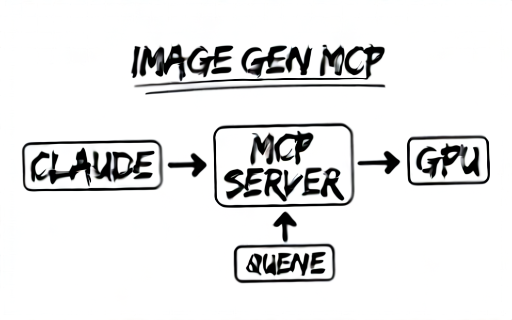
(Yes, “QUENE”. Qwen-Image got the diagram right and the spelling wrong, which is the kind of thing the text-faithfulness directive later in the post is trying to fix. Felt fitting to leave it.)
FastMCP (Streamable HTTP) on :8765
    ├─ tools: generate_image, edit_image,
    │         submit_async_job, get_job_status, get_job_result
    ├─ JobManager: asyncio.Queue + Future per job
    ├─ Worker: load adapter → drain queue → idle-unload
    ├─ ImageStore: PNGs on disk at /images/<uuid>.png, 1h TTL
    └─ HttpSubprocessAdapter (ABC)
        └─ SdcppServerAdapter: spawns sd-server child, talks via OpenAI-compatible API on :19765
The adapter abstraction was speculative (only one backend at v1) but turned out to pay back later when I tried a second one.
A few things I want to call out from the build phase that aren’t obvious from the diagram:
The model lifecycle is the whole game. Cold start for Qwen-Image-Edit is about 3 minutes (21 GB of GGUF off SSD, plus VAE and text encoder). Warm generation is 30-60 seconds. So you really want the model resident across bursts of requests but unloaded if the box has been idle for two minutes. That’s the BS-10 idle-timeout pattern and it dropped out cleanly because the worker is a single async loop that owns the adapter’s lifecycle.
Async jobs are not concurrent jobs. Two clients can both poll at the same time, but the GPU still does them one after the other. The async tool family (submit_async_job / get_job_status / get_job_result) exists so a client doesn’t have to keep an HTTP connection open for 60 seconds, not because there’s any hidden parallelism.
One adapter per process. I’d briefly thought about pooling adapters across model checkpoints, but BS-05 said “single pinned model, change requires restart” and that simplification carried right through.
The first commit landed two days after the brainstorm, and the server was end-to-end working by the next morning.
Multi-agent review, 30 actionable findings
Once the server was up I ran /software:review on the branch. That kicks off four parallel review agents (architecture, code quality, completeness, security) plus a validation pass that checks each finding against the code before it makes it into the report.
It came back with about 30 things ranging from “you’re not awaiting this future” to “the timeout on httpx is 60s and your model takes 90s warm”. I worked through them as fixup commits and rebased autosquash. Cleaner than fixing them serially as I go, and the validation pass noticeably cut the noise compared to running the agents alone.
A couple of the findings ended up reshaping things rather than just patching:
- The httpx client timeout was originally 60 seconds. When I bumped it to 600, then later to 1200, I started thinking about why I needed 20 minutes of timeout at all. Answer: 1024×1024 at 50 steps on Qwen-Image-Edit. Which is when I added BS-17 follow-up: a hard
IMAGE_MCP_MAX_DIMENSION=1024cap so a fat-fingered prompt can’t take the GPU offline for ten minutes. - The image store had no TTL. PNGs were just accumulating. Added a 1-hour sweeper that runs from the same async loop.
HTTPS, then the rsync booby-trap
Claude Desktop’s MCP connector can do HTTP but Tailscale-only HTTPS is more comfortable for “just works on any LAN”. I generated a self-signed cert on piai, dropped it in cert.pem/key.pem, and wired the FastMCP server to use it.
Then I redeployed and the service came back up on plain HTTP. Cert files gone.
Took me a minute to work out what happened. The start.sh script reads image-mcp.env to pick up the SSL paths, and my deploy command was:
rsync -av --delete server/ piai:~/image-mcp-server/
--delete deletes anything on the destination that’s not in the source. The cert, the key, and the env file all live on piai only, generated there, never checked into the repo. --delete wipes them every time I redeploy. Whoops.
Fix was just dropping --delete, plus a fairly stern paragraph in CLAUDE.md so future-me doesn’t forget:
Do not use
rsync --delete. Three runtime-only files live on the remote and nowhere else:image-mcp.env,cert.pem,key.pem.--deletewipes them and the service falls back to plain HTTP, breaking the extension.
That’s the kind of thing I want a junior-me agent to read before it tries to be helpful and “clean up stale files”.
The Claude Desktop saga
Claude Desktop talks MCP over stdio, not HTTP. There’s no “add a remote server” affordance for non-Connector users. So if you want a remote service usable from Desktop, you ship a stdio MCP extension as a .mcpb bundle that runs as a child process and proxies to the remote.
Wrote a thin Node.js proxy: tools/list and tools/call forwarded verbatim, plus a couple of bits of result-rewriting on the way back. Bundled it with esbuild because Desktop expects a single bundle.mjs. Used @anthropic-ai/mcpb pack to produce the .mcpb archive that you drag into Settings → Extensions.
The TLS bit was the first obstacle. Desktop’s bundled Node has its own root trust store and won’t accept a self-signed cert. I needed to bypass cert verification just for this one host without touching the Node runtime config globally. undici’s Agent with connect: { rejectUnauthorized: false } does it. Pass the agent as the dispatcher option and only fetches that go through it skip verification. Standard library’s fetch doesn’t expose a per-call option for this on Node 20, so undici earned its keep.
There was a fun esbuild detour where the bundled output crashed on require is not defined. undici uses dynamic require() in its lazy paths, which doesn’t survive ESM bundling. The fix was to keep undici as an external dep and ship it alongside the bundle. The bundle dropped from 3.6 MB to 328 KB and started working.
So now the extension installs, talks to piai over Tailscale-HTTPS, forwards tool calls. Time to actually use it.
The tiny Result button
I asked Claude Desktop to generate me an icon. It said it did. The chat showed nothing.
Tool call definitely succeeded. I went hunting. Eventually found that Desktop renders MCP tool results in a tiny collapsible “Loaded tools, used pi-image-gen integration” button below the assistant’s message, and inside that there’s a separate “Result” panel that opens to a side drawer that you have to scroll down in to see the actual ImageContent. Three clicks deep, in a drawer, with a layout that doesn’t tell you there’s an image waiting.
I’d been returning the right MCP content blocks all along. Desktop was just hiding them. That’s a Desktop UX choice (it’s reasonable for tools that return giant JSON blobs) but it’s awful for image-generating tools where you want the picture front-and-centre.
I tried a few approaches:
- Return only the URL, let Claude render it inline. Doesn’t work because Claude can’t render arbitrary URLs in the chat surface.
- Inline the image as base64. Tool result has a 1 MB cap, and a 1024×1024 PNG is ~1.5 MB. Would need to scale or strip metadata.
- Have the extension fetch the full-res image and save it to a known temp path on the host OS. Then inline a small preview, plus a
TextContentsaying “Saved to: /tmp/image-gen-abc123.png”.
Option 3 is what shipped. The extension intercepts the URL block on the way back, fetches the full PNG over HTTPS (with the undici agent doing the cert bypass), writes it to /tmp (host OS, not Desktop’s sandbox), and rewrites the result content to:
ImageContent(≤512 px preview, fits the 1 MB cap)TextContentwith the saved path
There was a wrinkle. macOS Claude Desktop runs in App Sandbox and os.tmpdir() returns a sandboxed path that the rest of the OS can’t see. So the extension has to explicitly use /tmp on macOS+Linux and %TEMP% on Windows.
The other wrinkle was dual-image bloat. I’d briefly tried sending both a thumbnail and a full-res blob inline via structuredContent, with the extension consuming the full-res for saving and replacing it with the saved-path TextContent. Worked at first. Then a server restart killed the MCP session, the extension reconnected, and Desktop started complaining about >1 MB tool results because the extension was forwarding structuredContent unchanged for all the other messages where we hadn’t intercepted. Fixed by stripping structuredContent after consuming it, plus adding a “reconnect on session-not-found” handler in the extension so Desktop doesn’t have to be restarted every time piai redeploys.
The last thing was teaching Claude that the inline preview might not be visible. Earlier docstrings said “if the inline preview isn’t visible, the file is saved at…”. User feedback: “ie didn’t give guidance on where to find the inline image above - it’s always not visible by default”.
Right. Made that unconditional. Every tool docstring now ends with something like:
The inline preview in this tool result is hidden by default in Claude Desktop. Tell the user where the saved file is.
Which is the BS-20 principle paying off again: the docstring is the only place you can put guidance that the agent will actually see at the right time.
The GLM side quest
Around the time the Desktop integration was settling, I read about zai-org/GLM-Image. Advertised as having particularly good text rendering in images, which is the bit Qwen sometimes garbles. Qwen-Image is generally fine but its text rendering is shaky on small fonts and longer strings, so I figured I’d give it a try.
Set up a parallel adapter: same HttpSubprocessAdapter ABC, new GlmImageAdapter, custom glm_server.py wrapping the diffusers GlmImagePipeline (initial plan was SGLang but it added too many deps). Pinned the model, wired it up, ran it. First batch of images came back and they were genuinely awful. Psychedelic colour bleeding, missing text, compositions that bore no relationship to the prompt.
Easy assumption: GLM is just worse than Qwen for our use case. But that was a 5-minute conclusion on something I’d put a couple of days of plumbing into. Worth a closer look.
It turns out the model card explicitly says guidance_scale=1.5 and I was running it at 7.5, which is the SD1.5 default I’d cargo-culted into the adapter. GLM-Image uses a flow-matching scheduler (not classic diffusion) and 7.5 is roughly five times too high. The output isn’t “wrong colour balance” wrong, it’s “the gradient is exploding” wrong.
Fixed the parameter, reran the same prompts, and the results were night-and-day different. Compositions made sense. Text was readable. It actually was pretty good at sign labels and notebook text, the things Qwen sometimes garbles.
So I ran a back-to-back at 512×512, six prompts, both backends:
| Prompt | sd.cpp / Qwen | GLM-Image |
|---|---|---|
| Sunset over mountains, oil painting | 47s, correct composition | 207s, no mountains |
| Pencil sketch cat on windowsill | 45s, on-style | 166s, photoreal not pencil |
| “DANGER HIGH VOLTAGE” sign | 46s, perfect | 168s, “DANGE”, no yellow |
| Sticky note to-do | 46s, “TODDO” typo but legible | 168s, blank notepad |
| Whiteboard flowchart | 46s, all labels right | 165s, only “start” visible |
| Concert poster “LIVE JAZZ TONIGHT 8PM” | 46s, all text right | 168s, partial text |
GLM is 3.5-4.5× slower and only pulls ahead on text rendering at 1024×1024 (which I never managed to test cleanly because each image at 50 steps was eating the 600s timeout).
Qwen wins on speed, on style adherence, and on composition. GLM might still win on text legibility at high res, but I’m not paying 4× the time for it.
Decision: GLM stays in the codebase but parks on a glm-backend branch, with main defaulting to IMAGE_MCP_BACKEND=sdcpp. The full eval is committed at docs/glm-evaluation.md. If a future Qwen-equivalent model with better text rendering comes along, the adapter abstraction is already there to plug it in.
The takeaway from that side quest isn’t “GLM bad, Qwen good”. It’s how easily the wrong parameter can make a perfectly fine model look like a broken one. If a model is producing nonsense, the fault is more likely in the config than in the weights, especially when the model card has a “recommended sampling parameters” section you didn’t read.
Templates, because cargo-cult prompts work
Once Qwen was settled as the default, I noticed the prompts I was hand-typing were all variations of the same two or three things. “Hand-drawn whiteboard, black marker, rounded boxes, simple arrows, no shading…”. “Flat clipart, clean outlines, solid colours, white background, no shadows…”. I was just rebuilding the same scaffolding every time I wanted a diagram or an icon.
So a small templates module:
|
|
The template body is just a starting point that the user (or Claude) edits before submitting. Templates aren’t applied server-side, that would be too prescriptive. They show up as presets in the web UI dropdown and as reference for prompt engineering when an agent’s calling the tool.
Guardrails, two layers
This service runs internal to a company that does engineering and medical-device work. There’s a real risk that someone (human or agent) asks it for a photorealistic prototype render of a product, gets something glossy and convincing, and uses it somewhere it shouldn’t go.
Two layers of defence:
Layer 1: agent-level refusal in the docstring. Every job-submitting tool’s docstring includes a “RESTRICTED USE” block with a verbatim refusal sentence. At tool-selection time Claude reads the description and is steered to refuse for engineering / CAD / UX-mockup / hardware-schematic asks. The wording is BS-20 territory: factual, frames as “best suited for”, lists appropriate uses (concept ideation, mood boards, stock-art-style) and inappropriate ones (photoreal product renders, dimensional drawings, medical/scientific imagery).
Layer 2: model-level steering via a baseline negative prompt. The server applies a BASELINE_NEGATIVE to every generation regardless of caller, prepended to whatever negative the caller passed. It currently looks like this:
engineering concept sketch, industrial design ideation,
product enclosure, mechanical housing,
UX wireframe, UI mockup, screen mockup, interaction flow,
PCB layout, circuit board, hardware schematic,
exploded view, assembly diagram,
product design render, CAD rendering,
lorem ipsum, placeholder text, gibberish text,
fake words, invented letterforms, text-shaped scribbles, garbled text
The first cluster is policy. The last cluster is the text-faithfulness one, which deserves its own paragraph.
Real words only
Diffusion models love to render text-shaped scribbles. You ask for a sign that says “DANGER” and you get a sign that has the right number of letters with the right approximate shapes and absolutely no semantic content. Or you ask for a whiteboard and the labels are confident-looking gibberish, which is worse than no text because it looks right at a glance.
Two changes:
The negative-prompt entries above explicitly call out the gibberish-text failure mode. Plus a positive directive that the server appends to every prompt before sending it to Qwen:
Any text appearing in the image must be real words in the language specified by the prompt (default English), spelled correctly, and contextually meaningful within the scene. Do not invent words, render placeholder or lorem ipsum text, or produce decorative letterforms that are not actual letters. If no specific text is requested, render no text at all rather than inventing any.
The directive lives in prompt_templates.py as TEXT_FAITHFULNESS_DIRECTIVE and gets appended in the sd.cpp adapter’s _build_prompt so it applies regardless of which tool path called in. Belt and braces with the negative.
Did it work? Mostly. Qwen still occasionally garbles, but the rate dropped noticeably and the failures look more like “spelling mistake” than “letter-shaped art”. Acceptable for whiteboards and signs, still wouldn’t try to generate a paragraph of text.
A web UI on the same backend
The MCP path is great for “Claude, draw me a thing”. For “I just want to play with prompts”, an agent loop is overkill. So a small web UI on the same :8765 port, served as a single-file webui.html plus four routes:
GET /api/templates, returns theTEMPLATESlist for the Style dropdownPOST /api/generate, takes{prompt, width, height, negative?}and returns{job_id}GET /api/jobs/{id}, returns{status, url?, error?}GET /, serves the HTML
The UI shares the JobManager, the worker, the queue, the adapter, the BASELINE_NEGATIVE, the MAX_DIMENSION cap. Everything. It’s literally another transport on the same backend.
Layout-wise it’s two columns: prompt+style+size on the left, preview pane on the right. Picking a Style fills the prompt textarea with that template’s body so you can edit placeholders before submitting. There’s a read-only “Excluded by policy” box that shows the active negative prompt so you can see what’s being filtered out, which felt important to surface rather than have it be invisible server-side magic.
Hosted on the same TLS endpoint as the MCP, so https://piai:8765/ in a browser gets you the UI, https://piai:8765/mcp gets you the protocol. No second process, no second cert.
The async tool, one more time
Last thing I tightened up before this post was the async tool family. The flow is supposed to be:
submit_async_job(prompt=...)returns{job_id}immediatelyget_job_status(job_id)returns{status: 'queued' | 'running' | 'complete' | 'failed'}- Once status is
complete, callget_job_result(job_id)exactly once to get the image
I wasn’t sure the agents were following this correctly, partly because the docstrings didn’t make the polling flow explicit and partly because get_job_result had a bug where calling it after the result had already been retrieved gave the misleading message “job is not yet complete”. The actual state was “result already drained from memory”. Fixed both, with the docstrings now spelling out the polling cadence (“poll every 5s, not faster”) and get_job_result returning a clear “result already retrieved” error if you call it twice.
|
|
Small fix, but it’s the kind of thing that’s nigh on impossible to debug from outside if the error message lies.
Where it sits
Three weeks from “let me try this Unsloth tutorial locally” to a service that has:
- A FastMCP server on
piaiexposing five MCP tools over Streamable HTTP with TLS - An MCP extension that proxies it to Claude Desktop, with full-res images saved to host
/tmpand reconnect-on-session-loss - A web UI on the same port with templates, size dropdown, policy-baseline negative prompt visible
- A
BASELINE_NEGATIVEpolicy that steers away from engineering/UX/CAD output - A
TEXT_FAITHFULNESS_DIRECTIVEthat meaningfully reduces gibberish-text failures - An idle-unload model lifecycle (load on first request, free VRAM after 120s idle)
- A 1-hour image cache TTL, a 1024 px hard size cap, async job tracking
- A parked GLM-Image backend on a branch in case I want to revisit at high res
- A CLAUDE.md that future-me will read before redeploying with
--delete
There are a couple of things I haven’t done. There’s no auth (it’s LAN+Tailscale only). There’s no rate limit (single GPU, single-flight queue is the rate limit). There’s no logging beyond stdout in tmux. The deploy is manual rsync. All of those would matter if this were anything but a personal/small-team service, and BS-12 explicitly said tmux for v1.
The bit I didn’t expect going in was how much of the work was in the seam between Claude Desktop and a remote MCP server. The model was the easy part. The Vulkan-vs-CUDA decision was the easy part. The agent-level refusal text in the docstring, the policy negative, the text-faithfulness directive, the dual-image transport, the structuredContent stripping, the reconnect handler, the cert bypass, the host-OS tmp dir handling, that’s where the time went. Image generation isn’t the hard problem. Plumbing image generation through five layers (sd.cpp ↔ adapter ↔ FastMCP ↔ MCP HTTP ↔ stdio extension ↔ Desktop UI) and getting each layer to behave is.
Now I just type “draw me a clipart icon of a coffee cup” and there’s an icon in /tmp ten seconds later.

Worth the three weeks.